Catapult logoCatapultAutomated iSeries Report & Document Distribution

Next Steps
Download a Free Trial
Request a Price Quote
Talk to a Product Specialist:
 630-986-0800
Schedule a Live Web Demo
Overview
 
Product Info
Catapult Home
Features
New Features
Installation Instructions
Getting Started
Product Sheet (PDF)
Product Ad (PDF)
Proven Software
Case Study (PDF)
Reviews
References
Testimonials
Awards
Support
Knowledge Base
Updates & Upgrades
Documentation
Requirements & Licensing
Feature Request
Technical Support Home

Tech Blog

Auto-deliver IBM i spool files, documents & reports to users in the format they want

5 Costs You'll Cut using Catapult

  1. Cut Paper, custom Forms & Printer costs
  2. Cut Mailing and Express Delivery costs
  3. Cut Ribbon and Cartridge costs
  4. Cut out manual Report Splitting & Distribution
  5. Cut Report and Document Storage costs
Automatic document and report distribution

Auto-deliver Reports to users in the format they want

5 Benefits You'll See using Catapult

  1. Distribution will be automatically managed
  2. Your Reports & Documents will arrive immediately
  3. Users will have them in the Format they want
  4. Storage and Retrieval can now be automated
  5. You will reduce overall Costs and your Budget

What is Catapult

Catapult is a PC and iSeries Client/Server application used to automatically distribute iSeries spool files or PC files to one or more users. Reports can be formatted as PDF, RTF, HTML, TXT or even as an XLS spread sheet and may be emailed, printed, faxed or archived to any network drive. It can also auto-file and auto-index reports and documents to the Web into organized folders in the FREE* Nexus ECM (Enterprise Content Management). When you export documents to the Nexus ECM you have the ability to automatically create unlimited search indexes based on content in the document such as PO number.

Add overlay images to your PDF, HTML and RTF reports

(Click image to enlarge)

Catapult includes everything needed in a complete report management solution for administrating, parsing, formatting, distributing and archiving spooled files, documents and reports. It also supports adding graphical form overlays for professional looking reports. Catapult integrates with Monarch for EZ-Pickin's, to automatically extract data into Excel, Access, MS-Word and more.

Catapult's automatic distribution options

"With its wide range of tools for administrating, parsing, formatting, distributing, and archiving spooled files and reports, Catapult exemplifies the breadth of possible features in a document management application."

J. Ghrist, Senior Products Editor, iSeries News Full review »

Catapult Highlights

  • Automated Spool File Distribution Management
  • Network Polling for PC file distribution
  • Forms/Graphics Overlays to transform plain text reports
  • Meet SOX requirements with complete distribution audit trails
  • Split reports
  • E-Mail, Fax and Print reports
  • Create PDF, RTF, TXT, HTML, etc
  • Web or Network Archiving
  • Integrates with the FREE Nexus Web portal for complete Enterprise Content Management (ECM) & Archiving

Learn more »

Catapult Benefits

  • Put critical information in the hands of the people who need it – Automatically and in their preferred format.
  • Save time with automated distribution.
  • Save money by reducing printing and mailing costs (Many clients save thousands of dollars each month. “For every page you don’t print, you save 6¢. Cut 20,000 pages per month, and save $1,200." Source:Gartner Group)
  • Go paperless.
  • Easy and reliable distribution of reports.
  • No programming required.
  • Great flexibility in selecting which reports to download automatically.
  • Intelligent and powerful report splitting capabilities.
  • Processing is off-loaded from the iSeries to the poller PC for actual splitting, archiving and emailing.
  • Seamless integration with EZ-Pickin's means your users can access report mining and data extraction capabilities.
  • Ability to run other PC applications to massage visual output before distribution.
  • Low cost of ownership and great technical support.
  • Catapult  is HIPAA compliant and meets SOX requirements because it has security features that limit access to the Catapult console (so that unauthorized personnel cannot create grab rules that would result in unauthorized or undocumented viewing of patient data) and because it has facilities to log the distribution of documents to individuals. This log can be viewed in the console, and can be saved, providing a complete and accurate audit trail of access to patient data.

How Catapult Works

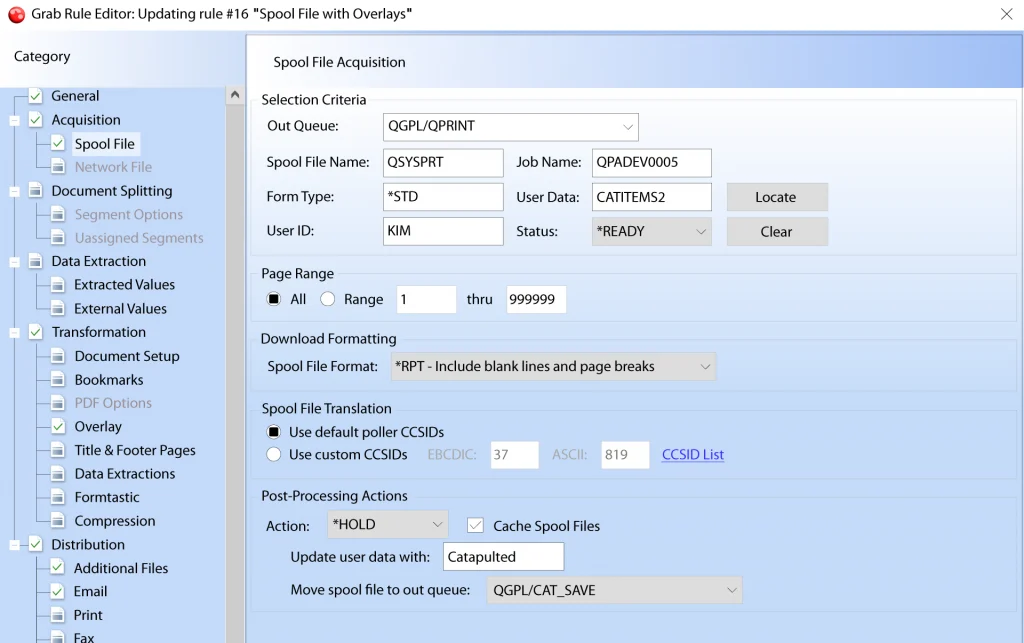
No programming is required to use Catapult and no changes to your programs or printer files are required. Using a Windows-based application, you indicate which spool files you want to distribute and how and where they are sent. When you distribute your documents, you can send them either to individuals or distribution groups defined within Catapult. At scheduled intervals Catapult looks at all the selected output queues on the iSeries to see if any new entries have arrived on the queue for distribution. Catapult also supports multiple iSeries hosts, so it is possible to distribute reports from any number of iSeries servers in your organization.

Catapult is Available as an Independent Solution or as Part of a Complete Integrated Solution Suite

Catapult integrates tightly with BCD's other solutions such as Nexus Portal, EZ-Pickin's, Spool-Explorer, WebSmart and ProGen Plus:

Nexus logo

Nexus Portal includes Enterprise Content Management where Catapult can auto-archive and auto-index iSeries spool files (with or without overlays) converted into PC file formats such as PDF, Word and many more. Nexus Portal provides secure access to web applications, documents, dashboards, KPIs (Key Performance Indicators), ECM and end user productivity tools.

Ez-Pickin's logo

EZ-Pickin's is BCD's PC-based Report Mining application. It lets you filter out any set of data from a report and format it for use in other PC applications, such as Excel. Catapult includes interfaces to EZ-Pickin's that let you apply an EZ-Pickin's model to a report as it is downloaded, to automatically reformat the data. The output from this process can then be archived or e-mailed.

Ez-Pickin's logo

Spool-Explorer is BCD's iSeries - System i to PC, E-mail & Web Spool File Distribution. You can create Catapult Quick rules (ZDSTSPLF) directly from Spool-Explorer for a selected spool file.

Ez-Pickin's logo

WebSmart can be used in conjunction with Catapult to provide a web front end to existing RPG report programs that generate spool files. WebSmart can call the existing report and also trigger Catapult commands that immediately grab, convert and distribute the spool file. WebSmart is BCD's award winning iSeries web development solution.

Try it out for FREE - Request a FREE price quote

Order Catapult on a Free Trial basis and see how easy automated report distribution can be! Get a Free Trial.

To receive a FREE PRICE QUOTE on individual products or the Bundle Click here.


Getting Started with Catapult for Automated IBM i Report Distribution

Register for free BCD Webinar

How to Mine IBM i Report Data and Extract it to Excel

View this recorded BCD Webinar

News

Why Waste Money and Kill Trees When Using Spool File Management Best Practices Preserves Both?
MCPress Online

More News...

Testimonials

"It used to take three days at the beginning of each month to print and distribute reports. With Catapult, this is now done in real-time during the night batch and everyone receives their reports via email on the first day of the month. No paper, no printer and real-time distribution... Just a dream!"

Serge Larisson,
GE Money

More Testimonials...