
Clover logoCloverIBM i Web Query and Reporting

Next Steps
Download a Free Trial
Request a Price Quote
Talk to a Product Specialist:
 630-986-0800
Schedule a Live Web Demo
Overview
 
Product Info
Clover Home
Features
New Features
Installation Instructions
Getting Started
Product Sheet
Product Ad
Clover Showcase
Video: Importing Query/400
Video: Creating a Drill Down
Video: Creating a Graph
Gallery: Item Dashboard
Gallery: Sales Dashboard
Code Examples
Proven Software
Case Study
User Quotes
Support
Knowledge Base
Updates and Upgrades
Feature Request
Documentation
Requirements & Licensing
Technical Support Home

Tech Blog

Design real-time web based IBM i (AS400, iSeries) reports and queries fast and easy

Clover Query is an IBM i web reporting and business intelligence tool that lets unlimited end users and IT personnel design and run real-time web reports and queries deployed in browsers. You can create reports and graphs in minutes using the Clover Query DB2, MySQL or MS SQL templates and SQL wizards that make it easy to write reports with totals, level breaks, drill downs, export to Excel or PDF, graphs using SmartCharts and Executive Dashboards.

You can also create ad hoc reports with Clover and use its full web development capabilities including dynamic library lists, editing records, change management and session ID handling. Plus, you'll save lots of money too, because Clover includes unlimited users. So whether you have 6 or 600 people needing to access or create reports the cost will be the same.

Clover also integrates with the following solutions to take you further: WebSmart, Free* Nexus Portal and SmartCharts.

Design real-time iSeries web reports and queries

(Click animation to view real-time sample)

Clover Highlights

  • Real time iSeries Web Queries & Reports
  • End Users, Power Users or Developers can create Reports
  • Drill Downs, Summaries, Flash Charts, Spreadsheets and Dashboards
  • SQL Wizards for Codeless Reporting
  • 20+ Reporting Templates
  • Fully Integrated with WebSmart
  • SmartCharts for Charts and KPIs
  • Nexus Portal for added Security and Controlled Access to Reports
  • Thin Client and Unlimited User License

More details at the At a Glance page »

Reports have never been so easy to create!

End users—produce reports by following the basic Wizard prompts.
Power users—build complex reports with minimal or no coding, using the more advanced features of the templates and the Wizard.
Developers—use Clover and all the power of WebSmart’s IDE to build even more sophisticated reports.

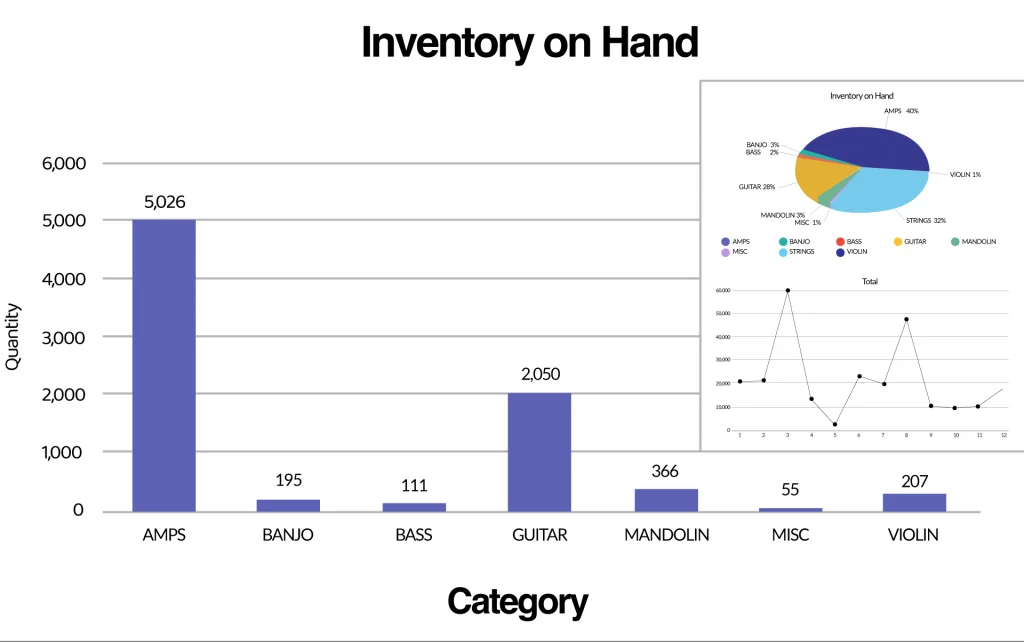
Create KPIs, charts and summary reports in 5 minutes
The KPI's, Charts and Summary Reports above were created in 5 minutes

Who Benefits

Anyone who wants to design iSeries reports and queries and deploy them in browsers-and anyone who cares about eliminating reporting requirement backlogs can benefit from Clover. Managers, power users and end users can even design their own reports without the need to ask programmers or designers to get involved. All levels of users can get timely, relevant, and accurate information on their desktops in a browser without client seats. And, users can access secured Clover-generated pages from anywhere: Internet, Extranet, or Intranet using very few resources.

Clover integration with WebSmart, SmartCharts and Nexus

Clover Integrates with WebSmart, Nexus and SmartCharts to further modernize business applications and processes:

Clover logo

WebSmart: Clover is not simply an add-on product to WebSmart, our iSeries web application development solution. Moving back and forth between the core features of WebSmart and the reporting features of Clover is seamless. And all of the tools that are a core part of the WebSmart IDE are available to developers using Clover.

You can actually write reports with little or no coding at all ! Clover’s own templates drive the report creation Wizards making it easy to design reports with breaks, subtotals, graphs, Excel spreadsheets and more. You can also relate many files (for example, join a header to a detail file) and specify just how you want the data sorted, filtered, and reported.

Nexus logo

Nexus: Nexus, our iSeries Web Portal and ECM solution, can provide the secure framework and organization required to provide users with secure access to their Clover reports and charts. It is also very easy to create Executive Dashboards or lists of links with your Clover queries and reports.

SmartCharts logo

SmartCharts: SmartCharts is an advanced set of KPIs, charts, graphs, gauges... that run as Flash objects and is included with Clover for free. Provide users with modern animated and professional quality graphical views of realtime data with drill down capabilities. Clover includes templates that incorporate SmartCharts with no coding required.

Learn more about Clover's New Features or Download a FREE Trial.


Clover Technical Overview (on-demand webinar)

Register for free BCD Webinar

Testimonial

"BCD walked me through the installation, and in about an hour, I was creating charts and graphs using my own data. I realized right off the bat that Clover and Nexus were very user friendly and BCD's support team was second to none."

Michael Ellis,
Key City Furniture
Read the Case Study »

More Testimonials...

In the Press
Query/400 Alternative from BCD Enhances BI Capabilities - Dan Burger, ITJungle
Integrated Products
WebSmart
SmartCharts
Nexus Portal & ECM

iSeries integration