catapult logocatapultSteps to Success

Follow the steps below to get started with Spool-Explorer.

If at any time you have a question or need help, get in touch with our Technical Support team at (250) 655-1766. Our support office is open from 7:30 AM to 5:00 PM Pacific Standard Time. You can also email us or call the BCD Sales team in Chicago at (630) 986-0800, open 8:00 AM to 5:30 PM Central Standard Time.

Download a Free Trial
Download a free, fully-functional version of Spool-Explorer that you can evaluate for 30 days. The installation instructions are available at this site. You should be able to complete the download and install in under 30 minutes.
Talk to a Product Specialist
Give our Sales office a call at (630) 986-0800 to talk to a Spool-Explorer specialist who can help you determine whether Spool-Explorer can fulfill your objectives, and discuss with you how you can best employ the software in your particular environment.
Schedule a Live Web Demo
Schedule a Live Web Demo of the software (or ask your Sales rep to do that for you).This will give you a quick idea of how the product looks and functions, and help you get yourself started as quickly as possible. You can also ask your sales rep to schedule a Technical demo with a member of our support team, to take a more in-depth look at the software.
Learn More About Spool-Explorer
There are several resources you can use to find out more about Spool-Explorer:
♦  Spool-Explorer at a GlanceOpens new window: The Spool-Explorer at a Glance page includes an overview of what the software is, as well as a summary list of the most important features.
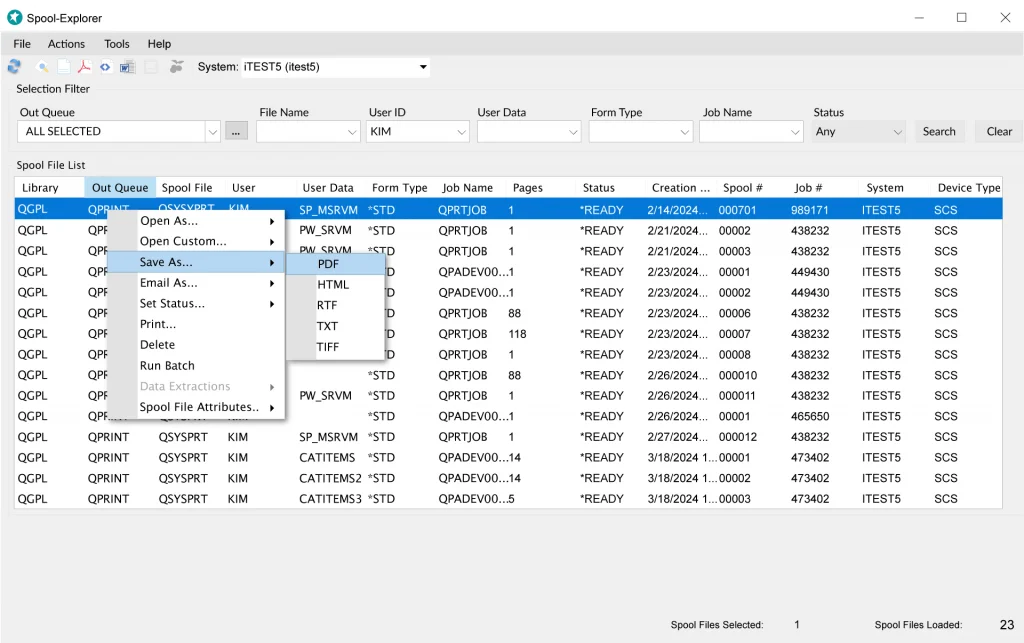
♦  Spool-Explorer FeaturesOpens new window: The Spool-Explorer Features page includes a detailed, illustrated list of the product's features.
♦  The Spool-Explorer User GuideOpens new window: The documentation includes chapters that present both general and in-depth illustrated overviews of the software, discussing what Spool-Explorer is, how to use it, and how to configure it to run as efficiently as possible.
Start Using Spool-Explorer
The Tutorial Exercises in the Spool-Explorer User GuideOpens new window will teach you how to download spool files, as well as how to set up the software to best suit you. The tutorial also describes how to use the ZDWNSPLF command to initiate spool file downloads directly from the iSeries.
Announcements...

BCD introduces Clover:
a Powerful and Easy-to-use End-user iSeries - i5 Query Tool delivering Browser Queries.

Integrated Products
Nexus Portal & ECM
EZ-Pickin’s
Catapult