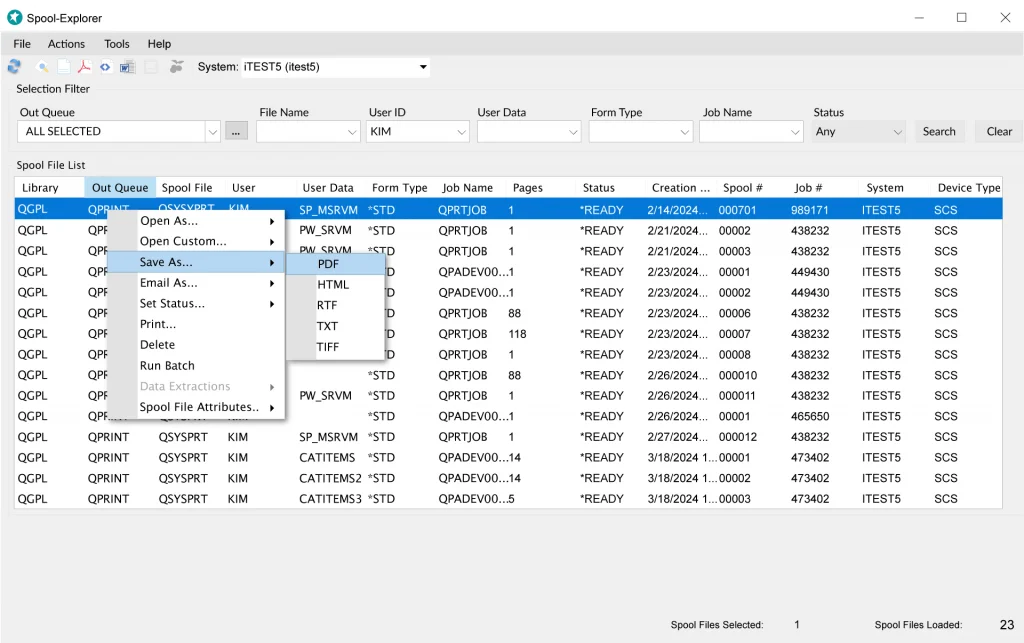
Powerful Spool File Display and Management in PC-based application
End users can easily view, download, convert and manage iSeries spool files from the powerful Spool-Explorer PC-based application. You get all the advantages of a Windows graphical application in terms of ease of use and flexibility. The spool file list can be sorted by options such as queue and userID and a simple double click is all that is required to display the spool file and a right click gives you options such as save, email and print to PC formats like PDF and Word. You can also open and view multiple reports simultaneously and connect to multiple iSeries to display reports.
Flexible Report Downloads
With Spool-Explorer you can download spool files from a PC application
by a simple point-and-click procedure, or by running an iSeries 400 command,
either from a command line or embedded within any iSeries 400 program.
You can select whether to download the report as it appears when displayed
on an iSeries session, without embedded blank lines between the space/skip-to
lines, or with all blank lines embedded. The latter option means that
you can view a report with exactly the same line spacing as used when
the report is actually printed on hard-copy. This is especially useful
for reports that are highly dependent on line positioning to be readable.
For example, invoices and purchase orders are often printed on pre-printed
forms, with certain information in fixed positions. Spool-Explorer makes
it easy to work with reports such as these.
Powerful Spool File Conversion
Options
When you download a sool file with Spool-Explorer, you can then
save it any of several formats: PDF, HTML, RTF, PRN or plain text. AFP
spool files can also be saved in TIF format. In addition, you can also build
and save customized formatting options that you can later re-apply to other
files of the same type. So for example, if you had a particular
report that required a certain page size, and needed to be saved as a PDF with
key field bookmarks, all these setting could be saved in a profile that can instantly
be applied to the report the next time you download it.
Distribution to Multiple
PC's
You can distribute reports to multiple PCs By using the iSeries command included
in Spool-Explorer. You can define a distribution list that references a set
of PCs that are ready to receive reports. You can then reference the distribution
list name instead of a single PC name on the download command. When executed,
the command retrieves the spool file data and proceeds to download it to a
file on each PC specified in the distribution list. Each PC can have its own
destination path (directory) defined for these downloads, so the reports can
be organized by each PC user.
Interface to EZ-Pickin's
EZ-Pickin’s is BCD’s PC-Based Report Mining application. It lets
you filter out any set of data from a report and format it for use in other
PC applications, such as Excel. Or, from within EZ-Pickin’s itself, you
can create new reports. Spool-Explorer includes an interface that lets you
launch EZ-Pickin’s with the push of a button, and also a powerful feature
to invoke the EZ-Pickin's autoscripting utility, which allows you to instantly
apply a data extraction model to a report, and export it to Excel (or any of
several other formats).
Publish Reports to the Web with Nexus Enterprise Content Management (ECM)
Spool-Explorer now allows you to make your iSeries reports available on the
web with full security and flexible search options. This is accomplished by
submitting your reports via Spool-Explorer to the Nexus Enterprise Content Manager (ECM).
You can also include search values extracted from the report text. Nexus is
BCD’s Award Winning iSeries web portal and is designed to make maintaining
and managing corporate Intranet or Internet sites easy in a secure environment.
Among the most important features in Nexus is the Enterprise Content Manager (ECM),
which allows you to archive documents to a directory in your IFS, and then
build criteria to control who has access to them.
PDF Functionality
In recognition of the ever-increasing importance of PDF format
for business communication, Spool-Explorer has a number of features related
to producing PDF files, including these: Support for PDF file compression
and encryption. Support for graphic overlays to be embedded in the PDF
file. Additional page sizes available. Additional fonts available. Support
for *RICH format downloads and Rich Format Tags.
|